Buying a Laptop? The Specs That Matter (and Those That Don't)

Quick answer: For everyday use, five things decide whether a laptop will feel good in three years: enough memory (RAM), a solid-state drive with room to breathe, a mid-tier processor from a recent generation, a screen you can actually read, and a warranty and return window you have checked in writing. Battery hours, “AI-ready” badges and peak-brightness numbers matter far less than the box suggests. Match the machine to your real job, then read the fine print.
Key takeaways
- Treat the operating system’s published minimums as a floor, not a target. Windows 11’s minimum is only 4 GB of RAM and 64 GB of storage (as of November 2026), and the software vendors you rely on often recommend more.
- Battery claims come from lab tests with fixed brightness and light workloads. Expect less in daily life.
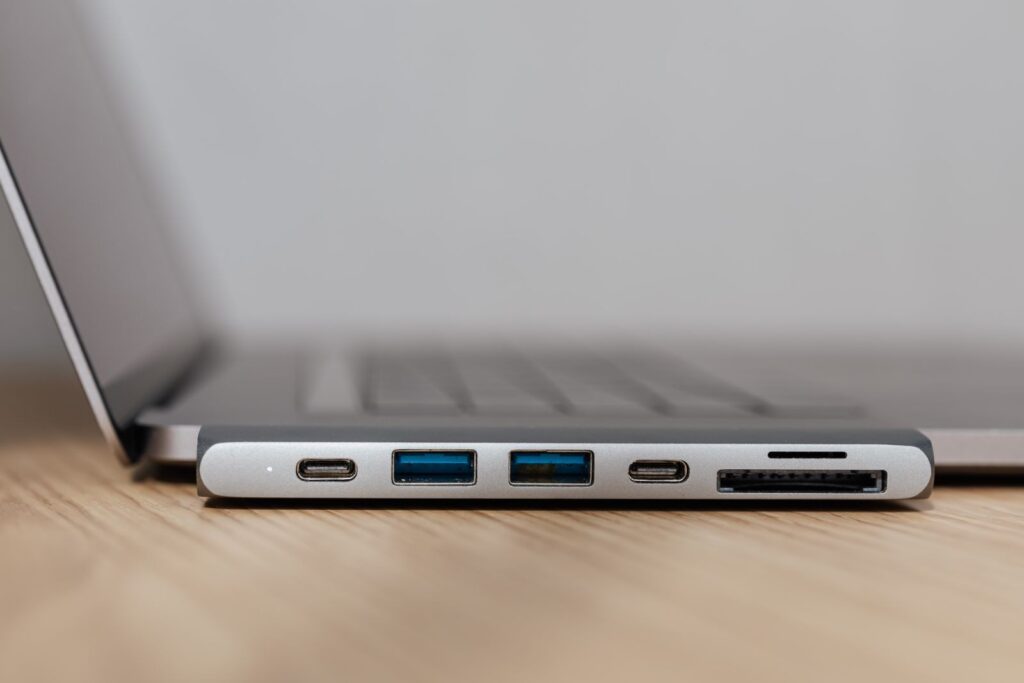
- Two USB-C ports can look identical and behave very differently. Look for the speed and charging labels.
- Repairability and software-update support decide how long a laptop stays useful, and they rarely appear on the front of the box.
- Read the warranty and return policy before you pay, and keep a copy.
The specs that really matter
Memory (RAM): the “how many things at once” number
RAM is the short-term workspace your laptop uses for open apps, browser tabs and video calls. Microsoft lists 4 GB as the minimum for Windows 11. That gets the system to start, not to feel pleasant. Zoom’s own requirements page lists 4 GB as the minimum for its desktop app and 16 GB as recommended. Microsoft’s Copilot+ PC tier, a specific feature tier on Windows, requires 16 GB. So 16 GB is a sensible comfort target for most adults who juggle tabs, calls and documents. Also check whether the RAM is soldered to the board, because that decides whether you can add more later.
Storage: type first, size second
Check that the main drive is a solid-state drive (SSD), not a spinning hard drive. Microsoft’s Copilot+ spec lists a 256 GB SSD, and one Windows gaming feature, DirectStorage, requires an NVMe SSD. Size depends on your habits: photos, videos, games and downloaded files fill space faster than documents do. Windows 11 itself needs 64 GB free at minimum, and Microsoft notes updates and features may need more over time, so a bare-minimum drive fills up quickly. Cloud storage and an external drive can stretch a smaller internal one.
Processor: read the tier, not just the number
Chip makers use tier names such as 3, 5, 7 and 9. Intel’s naming page explains that this “brand modifier” signals the tier within a family, that the letters at the end of a model name (H, U, V and so on) signal the design goal, and that a higher number is not a guarantee across different families and generations. In plain words: the tier is a hint, not a promise, so the exact model number is what you compare. Look up the full model on the chip maker’s own spec page.
Screen: size, sharpness and brightness you can see
Windows 11’s floor is a 720p display larger than 9 inches. For daily use, aim for at least full HD (1920 x 1080). In Valve’s Steam hardware survey for October 2026, about half of respondents’ primary displays were 1920 x 1080, so it remains the common middle. Test the screen in the store if you can: look for glare, check viewing angles by tilting it, and see whether the text is comfortable at your usual brightness.
Battery life: how to read the claim
Microsoft’s Surface battery page shows how a typical claim is built: a full-discharge lab test on preproduction devices, a fixed video file or a set of websites, brightness locked at 150 nits, and Wi-Fi connected. The same page says real life “can vary significantly” and that lithium-ion batteries lose capacity with age. An older independent test (Laptop Mag, 2020) found one laptop advertised at 18 hours lasting about 4 in its heavier web-browsing test. That is dated, but the lesson holds: compare claims only if they use the same test, and plan on meaningfully less for video calls and heavy tabs.
Ports and weight
Count the ports you use every week: USB-A for old accessories, HDMI, a card reader, a headphone jack. Microsoft’s USB team says “not all USB-C ports are created equal”: one may drive a 4K display while its twin only delivers basic USB 2.0 speeds. Look for printed labels such as “USB 40Gbps” or a Thunderbolt logo, and confirm in the spec sheet which port charges the laptop and which supports an external display. For weight, pick it up. A lighter laptop only wins if the charger is light too.
Marketing numbers you can mostly ignore
- Peak brightness and HDR badges: VESA’s DisplayHDR tiers are named for brightness, and 400 is the entry tier that was aimed at laptops (per a December 2017 report, so check VESA’s current program for today’s tiers). Ask what the screen manages for normal full-screen use.
- “Up to” battery hours: a ceiling under ideal conditions.
- Clock speed (GHz) alone: it says little across different chip families.
- “AI PC” labels: check which specific features you will use and what the hardware requirement is, such as the 16 GB and 256 GB minimums for Copilot+.
- Webcam megapixels: lighting matters more than the number.
Repairability, upgrades and update support
The EU’s new repairability label applies only to smartphones and tablets (A to E, since June 2025), and the page describing it does not mention laptops. Still, its six factors make a handy buyer’s checklist for any laptop: how deep you must dismantle it, how parts are fastened, what tools are needed, spare-part availability, software updates and repair information. Before buying, search for the model’s service manual and check whether the battery, SSD and RAM are replaceable. Also ask how long security updates are promised. As one example, Google lists 10 years of automatic updates for Chromebooks, counted from the platform’s release, and shows an “automatic updates until” date per model. Check that date before you buy.
On repair rights: in a July 2022 consumer alert, the FTC explained that under the Magnuson-Moss Warranty Act a company generally cannot void your warranty just because you used an independent shop or third-party part. It can still deny coverage for damage that repair or part caused.
Match the laptop to the job
| Use | What to prioritize | Baseline you can source (as of November 2026) |
|---|---|---|
| School | Battery you can trust, durability, update support, price | Windows 11 minimum: 4 GB RAM, 64 GB storage. For Chromebooks, check the “automatic updates until” date. |
| Office work and video calls | RAM, a good webcam and mic, ports for a dock | Zoom desktop app: 4 GB minimum, 16 GB recommended, quad-core 2.5 GHz recommended |
| Creative work | More RAM, fast SSD, color-accurate screen, cooling | Check the software maker’s current system requirements page for your app; we could not open one |
| Gaming | Graphics chip, cooling, high-refresh screen, NVMe SSD | Steam survey, October 2026: 16 GB is the most common RAM (about 41%), then 32 GB (about 37%) |
Warranty and return checks
The FTC’s business guide says a company is not required to offer a written warranty, but if it does, the warranty must be titled “full” or “limited,” and for products costing more than $15 the terms must be available before you buy. In practice, ask what it covers (battery? accidental damage?), how long it lasts, who pays shipping, and whether repairs happen at a shop or by mail.
For returns, the FTC’s online shopping advice is to find out who pays return shipping, how many days you get and whether there is a restocking fee, and to check separately for sale or clearance items. Paying by credit card gives you the best dispute rights; the FTC says to write to the card company within 60 days of the first bill showing the error. Save the policy, receipt and order emails.
Pre-purchase checklist
- Write down the three jobs the laptop must do, and check the vendor’s recommended specs for each.
- Confirm RAM amount and whether it is soldered.
- Confirm the main drive is an SSD and note the size.
- Look up the full processor model, not just the tier.
- Check screen resolution, size and brightness in person if possible.
- Find the battery test conditions behind the hours claim.
- List the ports you need and confirm which USB-C port does what.
- Find the service manual or repair information and the promised update period.
- Read the written warranty, then the return policy, then screenshot both.
- Choose a payment method that allows disputes.
Frequently asked questions
Is 8 GB of RAM enough?
It can run basic browsing and documents, and Windows requires only 4 GB. But Zoom lists 16 GB as recommended, and Steam’s October 2026 survey shows 8 GB on only about 7.5% of systems. If the RAM is soldered, buying more up front is safer.
Does a higher processor tier always mean faster?
No. Intel’s own page notes the number is not a reliable guide across families and generations. Compare exact models on the maker’s spec page.
Will opening the laptop void the warranty?
Under the FTC’s reading of federal law, a company generally cannot void a warranty only because you used third-party parts or repair, but it can deny coverage for damage they cause. Read your warranty terms, and ask the company to confirm in writing.
Can I count on the advertised battery life?
No. Microsoft’s page says real results can vary significantly. Treat the number as a comparison under lab settings and subtract for heavier use.
Before you decide
Skip the spec-sheet trivia contest. Decide what you need the laptop to do, buy comfortable RAM and an SSD, check the ports and update promise, and put the warranty and return terms in writing before paying. A slightly boring laptop that you can repair and return is a better deal than a flashy one you cannot.
Sources
- Find Windows 11 specs, features, and computer requirements, Microsoft
- Windows 11 requirements | Microsoft Learn, Microsoft
- Surface battery testing and estimated performance | Microsoft Support, Microsoft
- Ending USB Type-C Port Confusion: How Windows 11 WHCP Delivers Consistent Performance on Certified Devices, Microsoft USB Blog, Microsoft Tech Community
- Intel Processor Names, Numbers and Generation List, Intel
- Zoom system requirements: Windows, macOS, Linux, Zoom
- Steam Hardware & Software Survey: October 2026, Valve
- Auto Update policy – Chrome Enterprise and Education Help, Google
- New EU labels to help consumers choose more repairable electronics, European Commission Joint Research Centre
- New standard sets baseline for HDR on PC displays, Engadget
- Laptop battery life estimates are rarely accurate — here’s how they vary by brand, Laptop Mag
- FTC says companies’ warranty restrictions were illegal, Federal Trade Commission
- Businessperson’s Guide to Federal Warranty Law, Federal Trade Commission
- Online Shopping | Consumer Advice, Federal Trade Commission
Last updated: November 2026. This article is general information, not consumer advice.